

Key Takeaways
- Continuing to rely on legacy systems poses several risks that can hinder business operations and growth.
- Modernizing your technology creates opportunities for enhanced analytics, automation, predictive maintenance, and improved customer service.
- When transitioning away from legacy systems, it is crucial to think critically about the potential costs and benefits of a new technology before implementing it.
Legacy technology isn’t just slowing you down — it’s putting your organization at risk. From rising security threats to mounting maintenance costs, outdated systems are becoming harder to justify. And with tools like Microsoft Dynamics GP approaching end-of-life, now is the time to plan your next move.
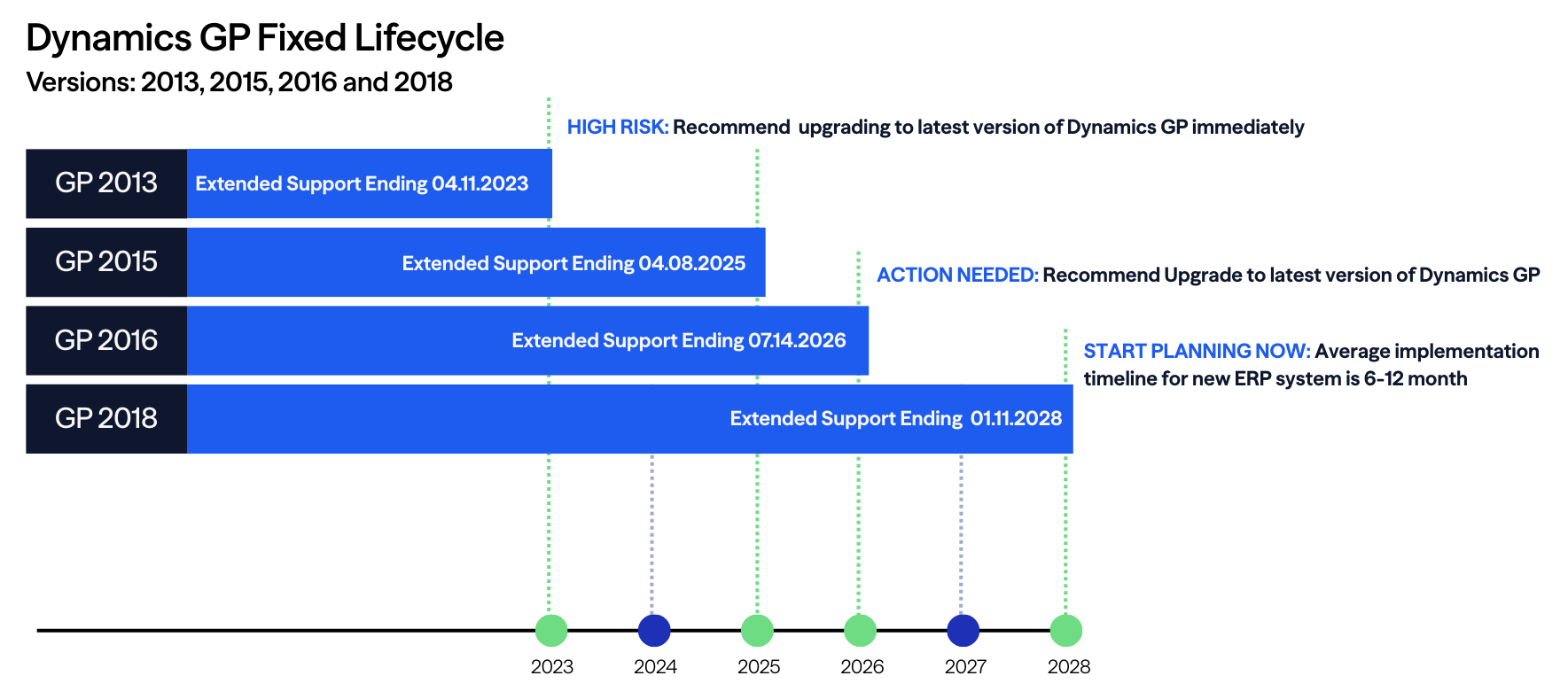
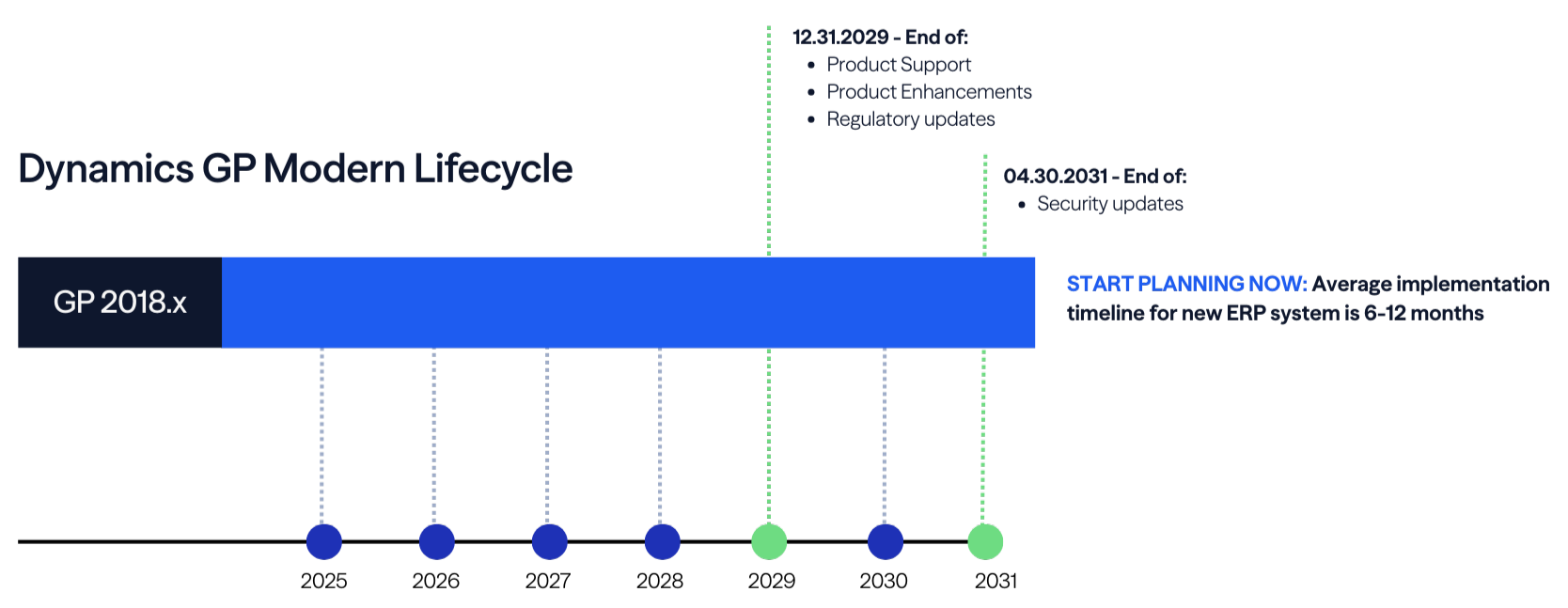
Misconception: Microsoft isn't sunsetting GP until 2031. We have plenty of time.
Reality: The timeline isn’t a deadline so much as a planning window. Using it early helps preserve choice and control as priorities, budgets, and platforms evolve. By staying on GP beyond 2029, your organization will also miss out on the latest features and innovations.
Listen as Eide Bailly’s Alan Clark breaks down the timeline.
Understanding the Risks of Legacy Technology
A significant portion of our clients — more than 75% of those polled — are still running Microsoft Dynamics GP. Continuing to rely on legacy systems like GP poses real challenges that affect your ability to grow, scale, and compete. Here’s what’s at stake:
For Operational Leaders:
- Inefficiency: Outdated tech leads to redundant steps and manual work, slowing down business processes. For example, manual data entry between disconnected systems delays reporting and increases error rates.
- Disconnected Data: Fragmented systems make it hard to unify data, track KPIs, and support cross-functional collaboration. Without a central view of data, leaders struggle to identify bottlenecks or act on performance insights.
- Limited Support: As legacy systems reach the end of their lifecycle, support from vendors and third-party experts diminishes — leading to longer downtimes and unresolved technical issues. When an outdated ERP crashes, teams often wait days for fixes that should take hours.
For Finance Leaders:
- High Maintenance Costs: Legacy systems eat into budgets, with as much as 90% of IT spend going to maintenance instead of innovation. This leaves little room for investing in analytics, automation, or future-ready tools.
- Compliance Risks: As regulations evolve, legacy platforms may lack the flexibility needed to stay compliant. For example, systems not updated for new tax codes or audit trails expose companies to penalties.
- Unclear ROI: Aging technology reduces your ability to measure and optimize return on investment. When systems can’t produce timely or accurate reports, strategic planning suffers.
For Tech Leaders:
- Security Vulnerabilities: Outdated systems lack modern security features, leaving sensitive data exposed. Older platforms may not support MFA or encryption, increasing breach risks.
- Integration Limitations: Legacy systems often struggle to connect with modern tools, leading to siloed systems and reduced scalability. Trying to bolt on cloud solutions creates technical debt instead of transformation.
- Support Gaps: As vendor support fades, internal IT teams are left to patch aging infrastructure with diminishing resources. This reactive approach drains capacity and delays strategic IT initiatives.
- Learn how legacy technology creates risks — and what you can do about it — in our e-book.
Embracing Opportunities for the Future
Transitioning away from legacy systems opens the door to modern technologies that can transform how your organization operates. Here’s what’s possible:
For Operational Leaders:
- Streamlined Workflows: Modern tools eliminate inefficiencies and support better collaboration across departments. For instance, integrated platforms can trigger automated handoffs between finance and operations teams.
- Unified Data Views: Centralized systems improve reporting, performance tracking, and decision-making. Dashboards pulling from a single source of truth give leaders clarity and speed.
- Improved Customer Experience: By leveraging AI-driven customer service tools, businesses can improve customer satisfaction and loyalty. Features like chatbots or personalized portals provide 24/7 support and faster resolution times.
For Finance Leaders:
- Smarter Analytics: Gain better visibility into financials, forecast performance, and support strategic planning with real-time data. Teams can simulate budget scenarios or cash flow projections with a few clicks.
- Cost Savings Through Automation: Free up resources and reduce errors by automating recurring tasks. For example, automating vendor invoice approvals can cut days off your AP cycle.
For Tech Leaders:
- Stronger Security Posture: Modern systems are built with advanced security features that help protect your infrastructure from today’s threats. Cloud-native platforms come with built-in identity management, encryption, and continuous monitoring.
- Improved Integration: Modern platforms offer APIs and open architecture, making it easier to connect your tech stack and scale with confidence. For example, syncing HR, CRM, and ERP platforms eliminates rework and manual reconciliation.
- Predictive Maintenance: AI can predict when equipment or systems are likely to fail, allowing businesses to perform preemptive maintenance — minimizing downtime and extending the lifespan of critical assets. This helps avoid unplanned outages and supports smoother operational continuity.
Best Practices for Evaluating New Technologies
Just because a tool is the newest or most acclaimed does not mean it is the best for your specific organization. Choosing your next platform isn’t just about what’s new — it’s about what works for your team, your strategy, and your bottom line.
Here are six key considerations to guide your evaluation process:
1. Feasibility and Viability
- What are the benefits of the new technology?
- Do you have the resources required to implement this technology?
- Is the ROI reasonable?
2. Application
- Is the publisher of the new technology stable?
- Will customization be required?
- Is information available regarding existing pilot projects or proof of concepts leveraging this technology?
3. Usability
- How difficult will the technology be to adopt?
- Can employees use the technology effectively and efficiently?
4. Integrations and Coordination
- Will the new technology integrate with our existing systems?
- What will be required from a process and systems perspective to add the new technology?
- Will the new technology affect our organization’s competitive advantage?
5. Security and Privacy
- Will the new technology improve current security requirements?
- Do we have individuals on staff who understand the impact, or do we need to engage a security expert?
6. Adoption Cost
- What are the costs and resources required to implement the new technology?
- With limited funding for innovation projects, is the investment justifiable?
- Investing in new technology is a critical decision. Download our CFO Tech Planning Toolkit for a clear, step-by-step walkthrough.
Future-Proof Your Technology for Smarter, Safer Growth
Transitioning from legacy systems to modern technology is crucial for businesses looking to stay compliant and competitive.
By understanding the risks of outdated technology, harnessing the power of AI and other modern capabilities, and thinking critically before implementing new technology, organizations can position themselves for long-term success.
Ready to leave outdated tech behind? Eide Bailly is here to help you make a smooth transition and get the most from your technology investments.
Frequently Asked Questions
Microsoft isn’t sunsetting GP until 2031. Why do we need to worry about transitioning now?
The timeline isn’t a deadline so much as a planning window. Using it early helps preserve choice and control as priorities, budgets, and platforms evolve. Your organization will also miss out on the latest features and innovations in the market and agile updates as regulations evolve by staying on GP beyond 2029.
Why is end of life (EOL) planning important for technology systems?
EOL planning helps organizations avoid security risks, unexpected downtime, and unbudgeted costs that occur when systems reach the end of vendor support. Proactive planning ensures stability, reduces disruption, and allows teams to modernize on a realistic timeline rather than reacting to emergencies.
How do I know when a system is approaching end of life?
Most technology providers publish lifecycle timelines outlining when products enter extended support, limited support, and full retirement. Monitoring these dates — and keeping a current technology inventory — helps organizations anticipate changes before they become critical.
What risks do end of life systems create?
EOL systems introduce security vulnerabilities, integration challenges, compliance gaps, and potential operational failures. Unsupported software or hardware can also limit scalability and make it difficult to adopt new tools or automation.
When should we begin planning for an upcoming EOL date?
Ideally, planning should begin 12–24 months before a system retires. This gives organizations the runway needed to secure budget, evaluate replacement options, prepare data migration paths, and coordinate change across teams.
How does EOL planning affect budgeting and resource allocation?
Early planning provides clarity on upcoming investments — from licensing and infrastructure to implementation and training — allowing organizations to phase costs strategically rather than absorbing large, unexpected expenses.
What’s the difference between upgrading, replacing, and modernizing a system?
Upgrading typically involves moving to the latest supported version. Replacing involves selecting a new tool or platform that performs the same function. Modernizing goes further by improving processes, integrations, and workflows — often unlocking new capabilities that were not possible with legacy systems.
How do end of life decisions impact cybersecurity?
Once a product reaches EOL, vendors stop providing patches and security updates. This creates vulnerabilities that can be exploited, especially in interconnected environments. Modernizing or replacing EOL systems closes these gaps and strengthens the organization’s security posture.
What factors should we consider when evaluating a replacement system?
Key considerations include business requirements, integration needs, scalability, total cost of ownership, vendor stability, and alignment with long term digital strategy. A structured assessment helps ensure the solution selected will support future growth.
How can we minimize operational disruption during an EOL transition?
Clear timelines, strong project management, stakeholder communication, data readiness, and phased implementation help reduce downtime and ensure teams adapt smoothly. Engaging technical and business leaders early also improves alignment.
What’s the first step in developing an end of life technology roadmap?
Start by inventorying existing systems, identifying upcoming EOL dates, and assessing the risks and dependencies tied to each asset. From there, prioritize replacements based on business impact and develop a timeline that aligns with budgeting cycles and organizational goals.

Build a digital strategy that will drive your organization forward.
Who We Are
Eide Bailly is a nationally ranked accounting and advisory firm bringing financial, operational, and technical solutions to middle market and high-growth organizations.